Microsoft | 2026
Building AI-powered meeting workflows for trust and verification
A Microsoft-sponsored capstone project exploring trust and verification behaviors in AI-powered meeting tools
AI-Powered
Industry-Sponsored Capstone
My Role
Lead Product Designer
Team
2 Product Designers
1 Researcher
1 Content Designer
Tools
Figma, FigJam, Microsoft CoPilot, Claude, Elicit, Zoom
Timeframe
overview
What would a trustworthy and verifiable AI meeting assistant look like?
A project with the Microsoft Customer Experience team. AI takes notes everywhere, but people rarely check the summaries they use to make decisions. There was no clear pattern for when people trust these tools or when they stop to verify. Our team set out to learn how people build trust with AI meeting tools, and what makes them verify.
What I did:
- Ran expert interviews and user interviews to narrow the problem space down
- Led co-design workshops that reshaped our design scope
- Built prototypes with Figma Make and Claude Code to test concepts quickly
- Defined the design system and brand guidelines
- Delivered wireframes and prototypes for the core flows
Outcome & Impact:
Prototypes, design recommendations, and AI adoption guidelines for Microsoft, plus a new meeting workflow built on a research-backed trust framework. It could potentially benefit:
320M+
Microsoft Teams daily users
1M+
Organizations that use Microsoft Teams
problem - context
Trust and verification in video conferencing
The business goal was to increase AI adoption among enterprise customers. From a literature review and 12 expert interviews, our team scoped to trust in video conferencing, where reliance on AI is rising but trust is not.
55%
of power users lean on AI to catch up on meetings they missed
Microsoft 2024 Work Trend Index
44%
of lapsed Copilot users blame distrust as the main reason they stopped
Copilot Adoption Statistics and Trends 2026
problem - research
Why people stop verifying meeting summaries?
We interviewed 7 professionals who use AI meeting tools and usually run back-to-back meetings. Most verify by a quick memory check, which is unreliable. Two reasons people give up:
1. The path to the source is too slow and fragmented
“I remember like, hey, I want to refer back to [this point], but I don't even know where it is. Everything is just everywhere.”
— P2
2. AI output sounds right even when it is wrong
“These things [AI] are so thirsty to make you happy that they will almost infer intent based on your questions and try to support you.”
— P4
How might we design a fast and well-integrated verification experience for workers, while maintaining healthy skepticism toward AI summary?
process - co-design
The real job of a meeting is alignment
My first assumption was that people verify AI summaries after the meeting, so the design should focus on post-meeting verification.
But after running a co-design workshop, I found that the real job of a meeting is alignment, and that aligning well during the meeting makes verification far easier afterward. So I redefined our direction around two moments:

process - concept testing
Straightforward vs honest
I built interactive prototypes in Figma Make and Claude Code to test both flows, alignment and verification. The most interesting finding came from the after-meeting verification flow, where I compared two versions.
Concept A: Verification Dashboard
A full report that flags items to verify with a confidence scale (high, medium, low).
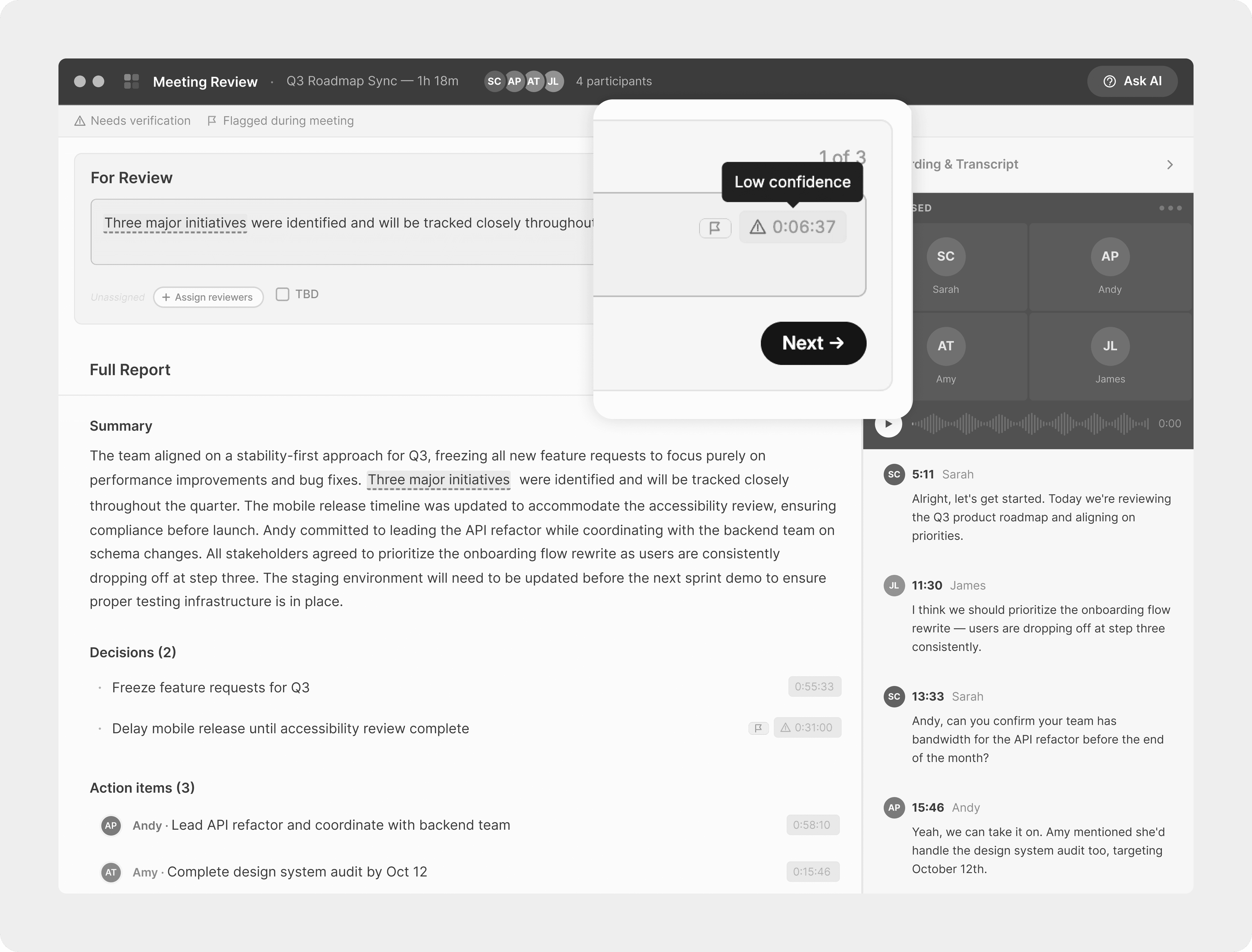
Concept B: Verification Chatbot
An AI assistant that walks through each uncertain item in conversation and asks follow-ups.

What I Learned:
All 4 participants preferred the dashboard for its control and full context. But the chatbot felt more honest, because of how it admitted uncertainty. So I chose the dashboard and brought the chatbot's honest voice into it.
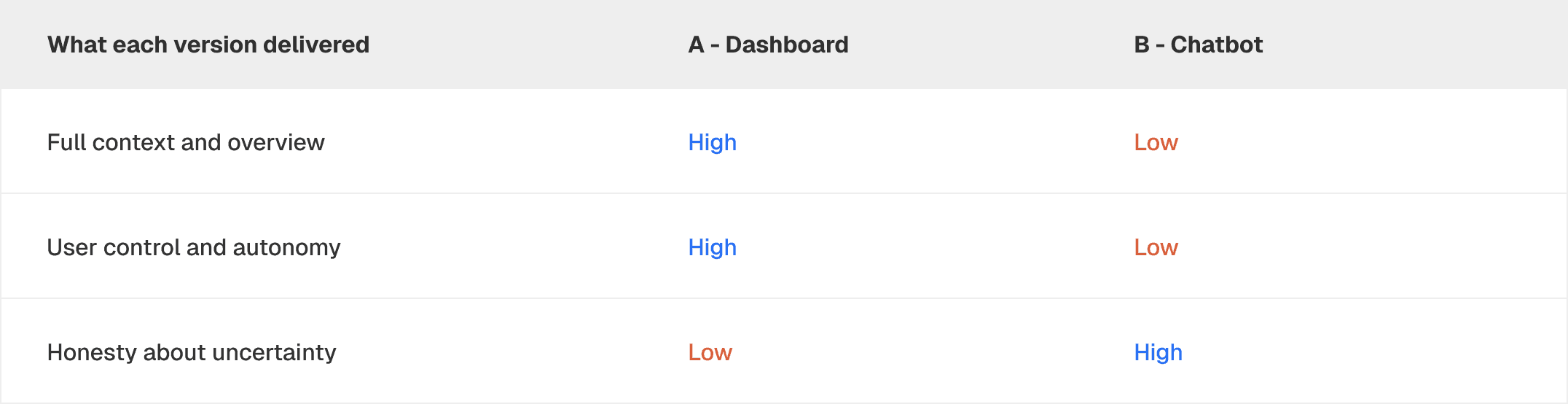
Trust came from two different places: the dashboard's control and context, and the chatbot's honest voice. The final design keeps the dashboard and borrows the chatbot's tone.
“I can easily see the overview and edit it. It (Dashboard) is a very easy, straightforward process.”
— P2
“I liked that it (AI chatbot) said it wasn't sure. It felt more honest than just flagging something in red.”
— P4
process - iteration
"We don't want our AI to look low-confident"
When I showed the design to Microsoft stakeholders, they worried a confidence scale would imply their AI is not capable. That created a real tension: users want AI to be honest about its limits, but a "low confidence" label reads as a red flag on the product. So I iterated to hold both.
Before
Items to verify, marked with a confidence scale. Clear, but it can make the AI look weak.
After
A warm, organic mascot we called Little Guy™ points out uncertain items in plain language. It says it is not sure, instead of showing a low-confidence score.
solution
01 Capturing decisions and to-dos
During the meeting, AI captures decisions and action items in real time in a collapsible side panel, so people control what is visible.
02 Wrapping up the meeting
As the meeting ends, the host can launch a wrap-up modal to align everyone before they leave.
03 Flagging uncertainty
After the meeting, AI highlights uncertain items for human review in plain language.
04 Tracing sources
Any insight links back to the exact transcript and recording, for full context.
Outcome & Impact
A new meeting workflow: align first, verify easier
The solution moves alignment ahead of verification, so hosts verify faster and with less effort after the meeting.

Reach and next steps
We shared the solution with 25+ Microsoft stakeholders and got positive feedback. The team is committed to sharing the research and solution with a broader group of stakeholders at Microsoft. If it ships in a future Teams release, its potential reach is over 320 million people and 1 million organizations.
“It’s inspiring to see research come to life in such a concrete way!”
— Senior UX Researcher @ Microsoft
Reflection
Keep designing for humans
This project designed AI workflows for people, which is where I care most as a designer. Good design uses new technology to give people more agency, not less. I learned to balance transparency and clarity, revealing enough about what AI can do and where it falls short without overwhelming people, and leaving the judgment with them. We designed AI for better decisions, not to replace the people making them. It also made me a more careful AI user, with a clear eye on what it can and cannot do.